
Enchanter – VIP+ How-to#
The Enchanter is available to all VIP+ members.
Use the following command:
/enchantingtable
to enchant an item directly.
Important#
Only Vanilla enchantments can be used.
The normal Minecraft enchantment rules still apply, so incompatible enchantments cannot be combined.
Example:
- Fortune and Silk Touch cannot be applied to the same pickaxe.
Enchantments are also always applied at their highest normal level.
How to Use#
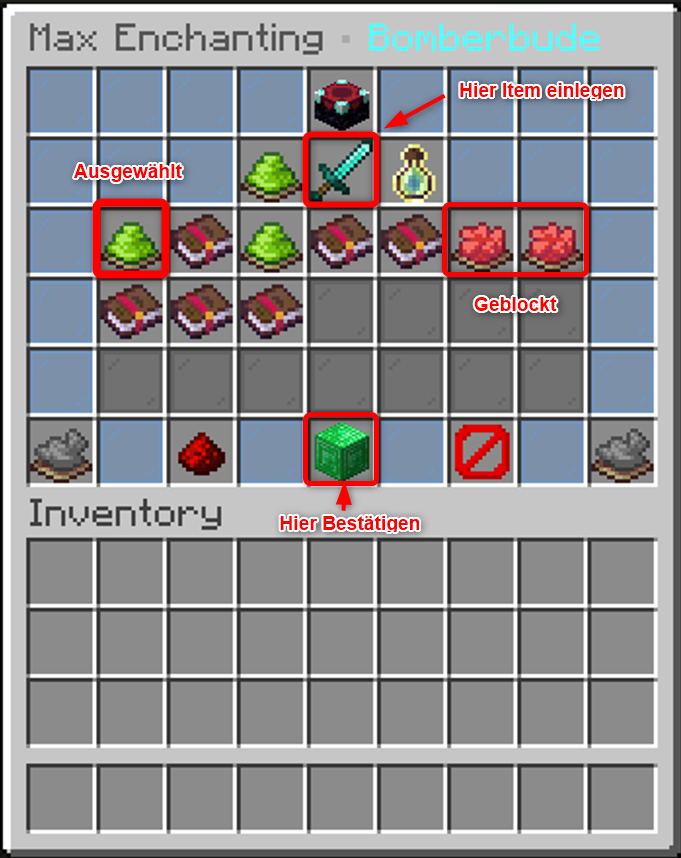
- Open the Enchanter with
/enchantingtable. - Place the item in the designated slot.
- Select the enchantments you want.
- Check your selection carefully.
- Confirm the enchantment using the confirmation button.
Warning#
The Enchanter can only add enchantments.
Enchantments that have already been applied cannot be removed using this menu.
Make sure you choose your enchantments carefully before confirming.
Was this page helpful?
55 views ·
1 older versions
· created by Arturschick